When developing an SPFx web part solution and have multiple configurations to make available in the property pane you can split those in multiple pages because luckily there is a built-in navigation handling in the property pane!
When developing a web part and using the method getPropertyPaneConfiguration you can see that the returned object contains a pages property that is an array of objects, each one of those objects contains:
- an header, with the name of the configuration page.
- a groups property, which contains the groups that are composed by:
- groupName, containing the name of the group.
- groupFields property that is an array containing the effective fields to be added in the current group.
Once specified the SPFx engine will handle itself the navigation!
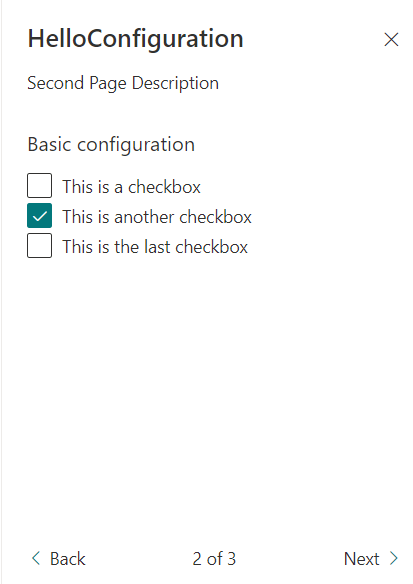
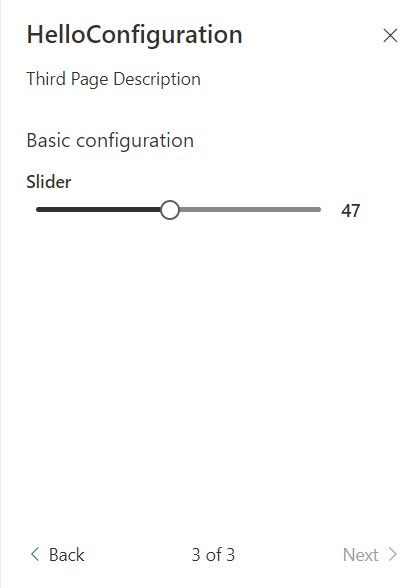
I’ve created a sample solution to show you how this will look like and how to achieve it. Starting with the result and focusing only on the property pane there are the results:
- The first page

- The second page
- The third and last page
The code of the getPropertyPaneConfiguration is the following:
protected getPropertyPaneConfiguration(): IPropertyPaneConfiguration {
  return {
    pages: [
      {
        header: {
          description: strings.FirstPageDescription,
        },
        groups: [
          {
            groupName: strings.BasicGroupName,
            groupFields: [
              ... omitted for brevity ...
            ],
          },
          {
            groupName: strings.AdvancedGroupName,
            isCollapsed: !this.properties.showAdvancedSettings,
            groupFields: [
              ... omitted for brevity ...
            ],
          },
        ],
      },
      {
        header: {
          description: strings.SecondPageDescription,
        },
        groups: [
          {
            groupName: strings.BasicGroupName,
            groupFields: [
              ... omitted for brevity ...
            ],
          },
        ],
      },
      {
        header: {
          description: strings.ThirdPageDescription,
        },
        groups: [
          {
            groupName: strings.BasicGroupName,
            groupFields: [
              ... omitted for brevity ...
            ],
          },
        ],
      },
    ],
  };
}
Here you can see that I have three items defined in the pages property, and also you can see that there can be multiple groups inside each page.
If you want to have a look to the code or test it yourself you can find the code here.
Hope this helps!

 I am GuidoZam