Introduction
The new version 1.23 of the SharePoint Framework brings a couple of new features, one of those features is the introduction of grouping for the ListView command set.
In this post I want to cover how this new functionality works and displays and to do this I’ve created a sample solution that you can find here.
Visual Appearance
Starting with the visual appearance of the grouping feature, following here’s how the grouping appears in a list:
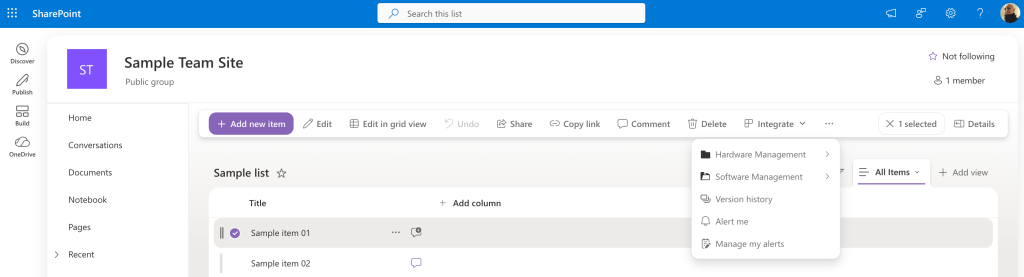
Let’s zoom a little bit to better see how the grouping displays.
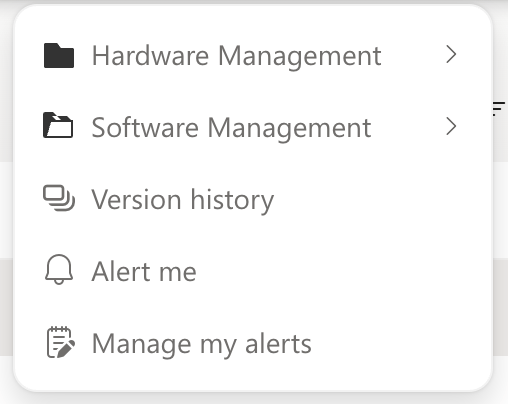
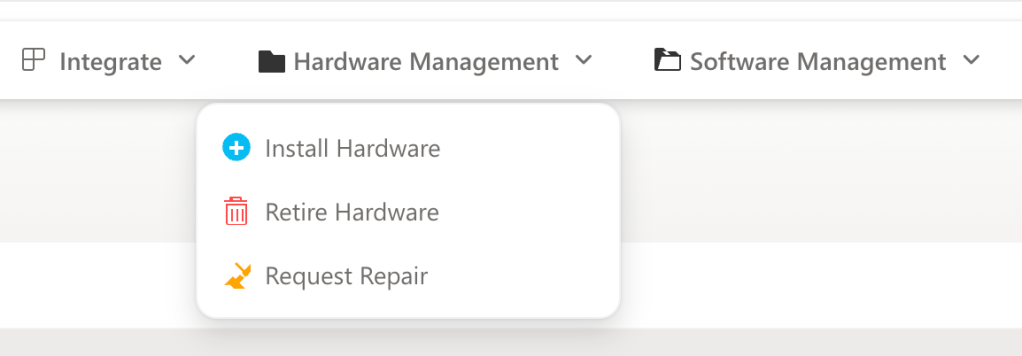
In the above screenshot the options Hardware Management and Software Management are groups (with custom icons) that contains other options. For example, in the Hardware Management group there are other three options:
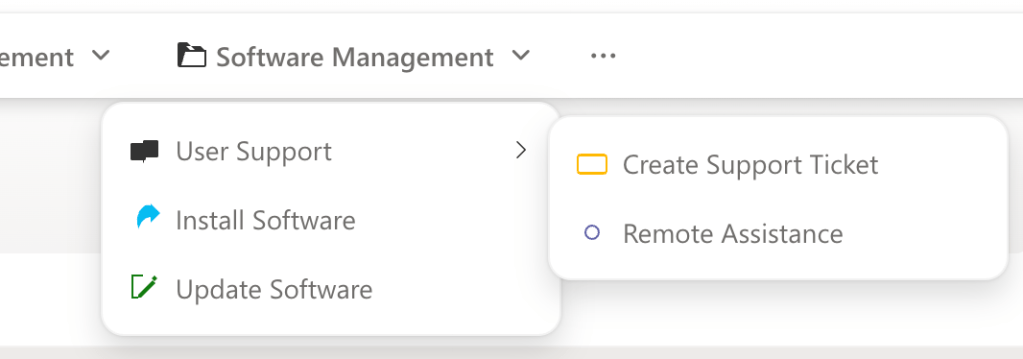
In the Software Management group, on the other side, there are a couple of simple options and another group User Support to demonstrate that it’s possible to have nested groups.
Now that we have an idea of the visual appearance let’s cover how to achieve that.
Show me the code
After covering the visual appearance, let’s cover the code that allows us developers to group the command set items.
I won’t cover how to create a ListView command set here, if you’re interested in knowing how to create a basic extension you can have a look here.
When defining a command, in the extension’s manifest, the structure is like the following:
"SAMPLE_COMMAND": { "title": { "default": "Sample command" }, ""iconImageUrl": "<omitted for brevity>", "type": "command"},
With the newly inserted property group, it’s possible to define that a command belongs to a specific group. For example, the previous example can become the following:
"SAMPLE_COMMAND": { "title": { "default": "Sample command" }, "iconImageUrl": "<omitted for brevity>", "type": "command", "group": "PARENT_GROUP"},
The PARENT_GROUP value is the actual name of the group.
In order to define that a command is a group instead of a simple command, it’s enough to change the value of the type property to group instead of command, for example:
"SAMPLE_GROUP": { "title": { "default": "Sample group" }, "iconImageUrl": "<omitted for brevity>", "type": "group"}
If you don’t want to check the sample solution on GitHub but still want to have a better view of how this grouping works, here are the commands and groups I’ve used:
"items": { "HARDWARE_GROUP": { "title": { "default": "Hardware Management" }, "iconImageUrl": "<omitted for brevity>", "type": "group" }, "SOFTWARE_GROUP": { "title": { "default": "Software Management" }, "iconImageUrl": "<omitted for brevity>", "type": "group" }, "SUPPORT_SUBGROUP": { "title": { "default": "User Support" }, "iconImageUrl": "<omitted for brevity>", "type": "group", "group": "SOFTWARE_GROUP" }, "INSTALL_HARDWARE": { "title": { "default": "Install Hardware" }, "iconImageUrl": "<omitted for brevity>", "type": "command", "group": "HARDWARE_GROUP" }, "RETIRE_HARDWARE": { "title": { "default": "Retire Hardware" }, "iconImageUrl": "<omitted for brevity>", "type": "command", "group": "HARDWARE_GROUP" }, "REPAIR_REQUEST": { "title": { "default": "Request Repair" }, "iconImageUrl": "<omitted for brevity>", "type": "command", "group": "HARDWARE_GROUP" }, "INSTALL_SOFTWARE": { "title": { "default": "Install Software" }, iconImageUrl": "<omitted for brevity>", "type": "command", "group": "SOFTWARE_GROUP" }, "UPDATE_SOFTWARE": { "title": { "default": "Update Software" }, "iconImageUrl": "<omitted for brevity>", "type": "command", "group": "SOFTWARE_GROUP" }, "CREATE_TICKET": { "title": { "default": "Create Support Ticket" }, "iconImageUrl": "<omitted for brevity>", "type": "command", "group": "SUPPORT_SUBGROUP" }, "REMOTE_ASSIST": { "title": { "default": "Remote Assistance" }, "iconImageUrl": "<omitted for brevity>", "type": "command", "group": "SUPPORT_SUBGROUP" } }
Conclusions
The new grouping feature brings a more organized and intuitive experience to the ListView command set. By enabling items to be grouped, the command set becomes more flexible and user-friendly.
If you want to know more about this topic have a look at the official documentation here.
Hope this helps!


One response to “New Feature for SPFx extensions: Grouping for ListView command set”
[…] New Feature for SPFx extensions: Grouping for ListView command set […]
LikeLike