Introduction
Lately I ran into an issue with a Power Automate flow. After exporting a solution with a specific flow to a different environment, I am facing an issue where the flow, which was running fine in the original environment, is turned off. When I try to turn on the flow I get the following error message:
![[REDACTED]](https://iamguidozam.blog/wp-content/uploads/2026/04/image-21.png?w=112)
[REDACTED]
Which, I think everyone can agree, is not a very useful message.
Due to the very obscure meaning of the message, I’ve tried opening the flow and saving it, this triggered the following error message:

Request to XRM API failed with error: ‘Message: Flow client error returned with status code “BadRequest” and details “InvalidOpenApiFlow”. Code: 0x80060467 InnerError: ‘.
Which can point to some direction, but it’s not a very helpful message…and, in all of this, the flow checker gives no errors!
The solution
At least in my case, scrolling through the actions, I discovered that an action was in error.
Following you can see the error in the old designer, which was not visible until I’ve expanded the action:
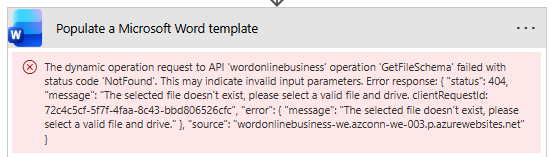
The dynamic operation request to API ‘wordonlinebusiness’ operation ‘GetFileSchema’ failed with status code ‘NotFound’. This may indicate invalid input parameters. Error response: { “status”: 404, “message”: “The selected file doesn’t exist, please select a valid file and drive. clientRequestId: <GUID>”, “error”: { “message”: “The selected file doesn’t exist, please select a valid file and drive.” }, “source”: “wordonlinebusiness-we.azconn-we-003.p.azurewebsites.net” }
The same error is present switching to the new designer.
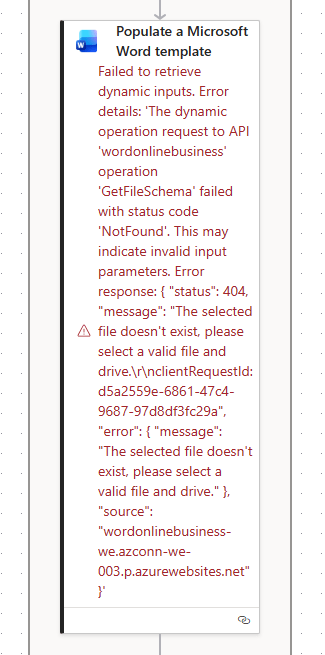
At least in the new designer the error was already visible without having to expand the action content.
So, what was the solution?
It simply was to update the selected document in the Word Business action, simply as that!
Hope this helps!


